
Televista
DEVXDATools
3.773.00 Reviews
- Version
- 1.1.9
- Installs
- 50.00K
- Age Rating
- Teen
Screenshots


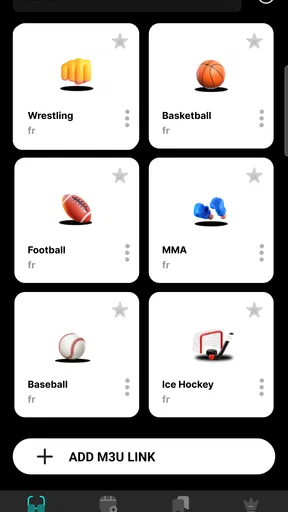
Our Review of Televista
 Analysis by Appyee
Hey folks! So, I’ve been diving deep into this app called Televista, and I’m here to spill the tea on everything you need to know about it. If you’re someone who loves binging on TV shows or catching up on the latest movies, this app might just be your new best friend. Let’s break it down, shall we?
Discovering the World of Televista
Alright, let’s start with the basics. Televista is your gateway to a world of television entertainment. Imagine having access to a massive library of shows and movies right at your fingertips. Sounds dreamy, right? Well, that’s exactly what this app promises. Available for both Android and iOS, it’s pretty versatile and fits snugly into your digital lifestyle.
Easy Peasy Setup
Setting up Televista is as easy as pie. Once you download it from either the Google Play Store or the Apple App Store, it takes just a few taps to get started. The user interface is super friendly, which means you won’t be scratching your head trying to figure out what’s what. Everything is laid out clearly, and navigation is a breeze.
The Features That Stand Out
Now, let’s talk features because that’s where the magic happens. One of the first things you’ll notice is the variety. Seriously, there’s something for everyone. Whether you’re into drama, comedy, action, or documentaries, Televista has got your back.
Personalized Recommendations: The app gets to know your preferences over time and suggests content tailored to your taste. It’s like having a personal TV guide that knows exactly what you want to watch next.
Offline Viewing: Got a long flight ahead? No worries. You can download your favorite shows or movies for offline viewing. That means no more boring commutes or flights.
High-Definition Streaming: Nobody likes buffering, right? With high-definition streaming, you’re guaranteed a seamless viewing experience, provided your internet connection is up to the task.
What’s the Catch?
No app is perfect, and Televista has its quirks. While the app is generally smooth, you might encounter occasional bugs. Sometimes, the app might crash or freeze, which can be a bit of a bummer, especially when you’re in the middle of an intense scene. However, the developers seem pretty responsive to feedback, and updates are rolled out regularly to fix these pesky issues.
Subscription Details
Let’s talk money. Televista operates on a subscription model. While there’s a free version available, it comes with ads, which can be quite interruptive. The premium version gets rid of these ads and unlocks additional content. If you’re a hardcore TV enthusiast, the subscription might be worth considering. Plus, there are often promotions and discounts, so keep an eye out for those.
Final Thoughts
So, what’s the verdict? All in all, Televista is a solid choice for anyone looking to elevate their TV watching experience. The vast selection and personalized recommendations mean you’ll never run out of things to watch. While it has a few minor hiccups, the overall experience is pretty satisfying.
If you’re tired of flipping through channels and want something more curated and on-demand, give Televista a shot. It’s like having the world of television in your pocket. Happy watching!
Verdict
Strengths of Televista
- Intuitive user interface enhances usability.
- Wide range of channels in multiple languages.
- High-definition streaming for most channels.
- Customizable notifications for favorite shows.
- Offline viewing available for select content.
Limitations of Televista
- Frequent ads can disrupt viewing experience.
- Limited content available offline.
- Some channels may experience buffering.
- Subscription required for premium features.
- Not all regions supported for streaming.
Similar Picks in This Category
View All
Google LLC4.0

Gboard - the Google Keyboard
Google LLC4.5

Google Play services
Google LLC4.3

Google Play Store
Google LLC4.9

Files by Google
Google LLC4.5

SHAREit: Transfer, Share Files
Smart Media4U Technology Pte.Ltd.4.3
Frequently Asked Questions
What features does Televista offer to its users?
Televista provides users with a comprehensive suite of features, including live TV streaming, video-on-demand options, and a personalized content recommendation system. It also supports multiple user profiles, allowing each member of the household to have their own viewing preferences. Additionally, it offers offline downloads for watching content without an internet connection.
Is Televista available on both Android and iOS platforms?
Yes, Televista is available for download on both Android and iOS devices. Users can find the app on the Google Play Store for Android and the Apple App Store for iOS. The app is optimized for both smartphones and tablets, ensuring a smooth viewing experience across different devices.
Does Televista require a subscription, and what are the pricing options?
Televista operates on a subscription model, offering several tiers to cater to different user needs. Typically, there are monthly, quarterly, and annual plans available, each with varying access levels to content. Some plans may include a free trial period, allowing users to explore the app's features before committing.
Can I use Televista on multiple devices simultaneously?
Televista allows users to stream content on multiple devices at the same time, depending on the subscription plan chosen. Standard plans may support streaming on two devices simultaneously, while premium plans may allow for up to four or more, making it ideal for families or shared households.
How does Televista ensure content quality and reliability?
Televista uses advanced streaming technology to deliver high-quality content with minimal buffering. The app supports HD and 4K streaming options, depending on the user's device capabilities and internet connection. Regular updates and a dedicated support team ensure the app remains reliable and user-friendly.
